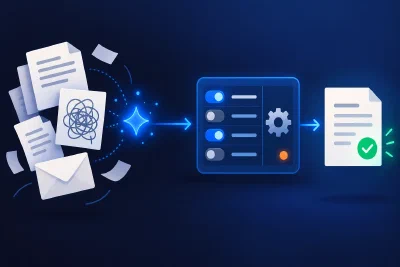
A software bill can be frustrating when you are paying for features you barely use, while something your business needs sits behind another paid add-on. It gets worse when adapting the product takes more effort than the task itself.
AI coding tools give you another option. A small application that was difficult to justify commissioning may now be worth exploring. That changes the build vs buy software decision, especially for internal tools, reports and awkward gaps between systems.
The useful comparison includes everything each option asks of your business: money, people’s time, expertise and ongoing responsibility. Sometimes that supports a custom build. Sometimes the subscription earns its price. And sometimes you should keep the product and build one missing piece around it.
TL;DR:
- Start with what the current tool does well and what you actually need to change.
- Compare costs over the same period, including workarounds, development, deployment and maintenance.
- Count the owner’s time, the team’s time and someone experienced enough to guide and check the AI’s work.
- Consider configuration, a small extension or an existing open-source project before commissioning a replacement.
- Control, privacy and better fit can justify building even when it is not the cheapest option. Be clear about what you are paying to gain.
Start with what your existing software does well
Before listing everything you dislike about a product, write down what you would miss if it disappeared tomorrow.
Perhaps staff know how to use it. Its reports reconcile with your accounts. It connects to other systems, manages permissions properly and has someone available when an update breaks something. Those benefits belong in the requirements for whatever comes next.
Then describe the friction precisely. “Our CRM is expensive” gives you little to work with. “Twenty people need an expensive licence just to check one status and approve one step” gives you something you can investigate.
The same applies to missing features. How often does the problem occur? Who works around it? How much time does that take? Could a different configuration, plan or existing integration solve it?
A useful starting document has two lists: what must keep working and what needs to improve. A replacement that removes one frustration while losing three useful capabilities has more work left in its budget.
Why I chose to build PRAHO
I ran into this in hosting software. In the WHMCS setup I was working with, relatively ordinary requirements meant another paid add-on: giving some customers 30 days to pay an invoice, others 60 or 10, or getting better visibility into how long support tickets took to resolve.
For the ticket reporting, we could also have developed something ourselves. But modifying a partially closed-source product was painful, and there were other things I wanted it to do differently.
I created PRAHO to start PragmaticHost, with the intention of passing cost savings on to hosting customers. That thinking also influenced the choice of Virtualmin instead of cPanel and using open source wherever it made sense.
Price was one reason. I also wanted control over the direction of the software and to contribute something useful to the open-source community. When improvements remain available to others, the knowledge stays in the internet ecosystem. We can build on each other’s work instead of repeatedly spending human effort solving the same problem in isolation.
There is a personal part to this decision too: I care about web hosting and wanted an open-source project I could develop towards my own vision. Without that interest, I might not have taken on a project of this size. I certainly would not rebuild every tool I use.
After the initial jolt of getting something working, you face an absolute ton of decisions. Stability, security, deployment and the needs of actual users all require sustained attention. AI helps with that work, but somebody still has to care about the result.
A business can provide that commitment through a funded team or a development partner. Passion is one reason to keep going. High licensing costs, poor fit or a need for control over the code can provide a business reason. Either way, the work needs time, knowledge and a budget beyond the first version.
Build the missing piece before replacing the whole product
Suppose your CRM serves the sales team well, but an approval process is awkward and expensive. A small application that reads the necessary records and manages that step may solve the problem while preserving the rest of the CRM.
You would first need to check whether the product’s API, contract and licensing allow that arrangement. An extension also needs maintenance when the underlying system changes. Its scope can still be much smaller than replacing customer records, reporting, integrations and every other workflow the CRM supports.
There are contemporary examples beyond hosting. In Replit’s customer story about Plaid, a member of Plaid’s team built an internal dashboard for support commitments, ticket information and uptime. It used fields available through Plaid’s existing Zendesk integration. The useful pattern is a focused view of information the team already had, built around an existing system.
Another Replit customer story describes Helix Electric building tools to turn construction schedules in PDFs into searchable information and to produce consistent work instructions. Helix also chose a platform with access controls that connected to its existing sign-in system. Even when you build an application, it can make sense to buy the foundations underneath it.
These are vendor-published accounts. They illustrate possible uses, rather than providing a budget or a promise of savings for your business.
Claire Vo and Zach Davis make a similar case for extending existing tools in their discussion of build versus buy. Your options include configuring what you have, connecting a small custom tool, adopting or extending open source, and building a replacement. Compare those options before assuming the largest build is necessary.
Count the time and expertise behind the AI
Someone has to explain the requirements, resolve contradictions, review decisions and check whether the software behaves correctly. Experience helps that person recognise a missing question before it becomes a missing feature or a production problem.
That work belongs in the budget whether you hire an engineer, involve a development partner or do it yourself. The owner’s evenings count. So do the hours staff spend trying the tool, reporting problems and learning a new process. Those hours have an opportunity cost: the business could have spent them elsewhere.
Simon Willison’s discussion of cheaper code and the cost of good software makes this distinction clearly. Correct behaviour, tests, documentation, reliability and suitability for future changes all need attention. Coding agents can help with much of that work, while the person guiding them remains responsible for checking the result.
Give AI credit where it actually reduces the effort, including maintenance. Then estimate the human work that remains. An AI subscription bill alone cannot tell you what developing the tool will cost.
Apply the same honesty to buying. Time spent exporting spreadsheets, copying records, chasing support or maintaining awkward workarounds belongs on that side of the comparison.
Compare the full costs over the same period
For a tool you expect to use for several years, compare both options over those years. Include the transition and the period when you may need to pay for both systems. Count only the licences you can actually stop paying for.
Here is an illustrative three-year comparison for a small internal workflow tool. These are invented assumptions to show the calculation, not vendor prices or a PRAHO budget.
The existing product costs €40 per user per month for 25 users. The custom option takes 160 hours of experienced development, review, testing, deployment and migration at €75 an hour, plus 40 hours of owner and team time for requirements, checking and training at €50 an hour.
The custom tool’s annual budget includes four hours of skilled maintenance a month and €1,200 for hosting and software. Both options allow 30 hours a year for internal administration and support at €50 an hour. Value people’s time even when they are already on the payroll.
| Cost | Keep the existing tool | Build the custom tool |
|---|---|---|
| One-off development and transition | €0 | €14,000 |
| Annual licences, hosting and software | €12,000 | €1,200 |
| Annual skilled maintenance | Included in the subscription | €3,600 |
| Annual internal administration and support | €1,500 | €1,500 |
| Total over three years | €40,500 | €32,900 |
Under those assumptions, building costs €7,600 less over three years. But if skilled maintenance takes eight hours a month instead of four, its total rises to €43,700. That changes which option costs less.
The next useful step is to investigate that uncertain maintenance estimate. What changes regularly? Which external systems does the tool depend on? Who will handle a failed update, and what capacity have they reserved for it?
Add the other costs that apply to your situation: migration, training, backups, monitoring, usage charges, future changes and handing the system to another maintainer. Check whether the proposed replacement really preserves the benefits on your first list.
Then compare value as well as expenditure. Better fit or control may justify a higher total. If that is the decision, describe the additional benefit clearly rather than presenting it as a saving.
Control and open source can be reasons to build
With sensitive data, you may need to understand how the software handles information from beginning to end. Access to the code and control over deployment can help you examine that. They also give you responsibility for maintaining the controls you rely on.
Look at the complete path: where records are stored, what appears in logs, which services receive copies and who can access them. A custom interface that sends information to an external service still involves that service. Our guide to company data in AI tools covers the questions to ask about those data flows and vendor terms.
Open source adds another possibility: finding a project that already handles most of the job, then funding improvements or contributing the missing capability. That can provide the transparency and flexibility you want while building on knowledge others have already shared.
The project still needs evaluation. Check how it is maintained, what its licence permits, how you will operate it and how you will keep your changes working with future releases. Paying for managed hosting or support can be a sensible part of an open-source approach.
For me, contributing something reusable is part of PRAHO’s value. A business can decide that contributing to a shared foundation serves its interests too. Building every component from scratch would work against much of that benefit.
Measure the assumptions that could change your decision
In a recent choice between Django and Go for another project, I expected reusing existing Django code to be a major advantage. I tested that assumption and found the advantage was much smaller than I had expected with coding agents doing the implementation.
The measurements also showed differences in server resource use. At the scale of the initial pilot, though, those differences were not going to reduce the server bill. I still had to weigh expected maintenance, familiarity and my own time reading and debugging the result.
That is useful beyond choosing a programming language. Find the assumptions carrying your build-versus-buy case and test the ones that are cheap to test.
If the proposed benefit is avoiding manual reporting, measure the reporting work now. If an integration looks straightforward, test it with representative records and the actual permissions. If the budget depends on replacing 25 seats, confirm that those users will no longer need the old product.
For a nontechnical owner, those checks need evidence you can understand. Our guide to evaluating development work without reading code covers demonstrations, testing and recovery questions you can use with the people doing the work.
Make a decision you can explain and maintain
Before committing to a build, write down:
- The need: what must improve and what the existing tool does well.
- The alternatives: configuration, another product, a small extension, open source and a custom replacement.
- The full budget: development, experienced guidance, owner and team time, transition and ongoing operation over the same period.
- The responsibility: who will maintain it, how much time they have, and how another person could take it over.
- The evidence: which assumptions you tested and which uncertainties could change the decision.
Buying makes sense when a suitable product delivers what you need at a cost that compares well with taking on the work yourself. Building makes sense when the savings, fit or control justify that work and you can fund it. A small extension may give you the improvement you need with a much smaller commitment.
AI has made more software ideas practical to explore. Use that opportunity to solve a specific business problem, with an honest account of what it will take to keep the solution useful.